
Instead of hard-coding the table name in the save_as_table() property, we can provide it as a parameter named FAKE_TABLE_NAME to the stored procedure.
The complete code of the stored procedure now looks like this:
CREATE OR REPLACE PROCEDURE GEN_NAMES(FAKE_TABLE_NAME VARCHAR, ROWS_CNT INTEGER)
RETURNS VARCHAR
LANGUAGE PYTHON
RUNTIME_VERSION = '3.8'
PACKAGES = ('snowflake-snowpark-python', 'faker')
HANDLER = 'gen'
AS
$$
def gen(session, FAKE_TABLE_NAME, ROWS_CNT):
    import faker
    from snowflake.snowpark.types import IntegerType, StringType, DateType, StructType, StructField

    fake = faker.Faker()
    customers_str = fake.csv(data_columns=('{{name}}', '{{street_address}}', '{{phone_number}}', '{{ssn}}', '{{date}}'), num_rows=ROWS_CNT, include_row_ids=True).replace('"', '')

    schema_for_customers = StructType([
        StructField("ID", IntegerType(), False),
        StructField("NAME", StringType(), False),
        StructField("ADDRESS", StringType(), False),
        StructField("PHONE", StringType(), False),
        StructField("SSN", StringType(), False),
        StructField("BIRTHDATE", DateType(), False)
    ])

    cust_df = session.create_dataframe([x.split(',') for x in customers_str.split('rn')[0:-1]], schema_for_customers)
    cust_df.write.mode("overwrite").save_as_table(FAKE_TABLE_NAME)

    return('Success')
$$;
To execute the stored procedure, for example to generate 100 customer records and save them to Snowflake in a table named FAKE_CUSTOMERS, we use the following command:
CALL GEN_NAMES('FAKE_CUSTOMERS', 100);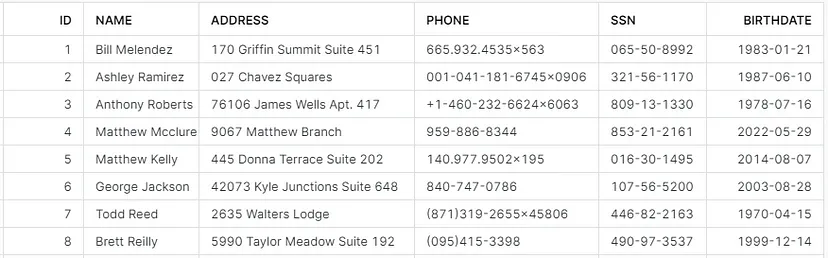
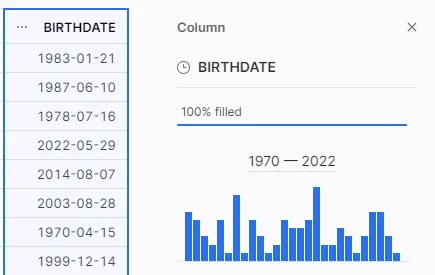
We can also verify that the data types have been populated as per the provided schema, for example we can click the BIRTHDATE column heading in Snowsight to view the data type and distribution of this column:
The above stored procedure can of course be modified as needed to fulfill various requirements for generating sample data.
Maja Ferle
Senior Consultant and Snowflake Data Superhero
Senior Consultant and Snowflake Data Superhero